 SkylitDocsGet Skylit
 Arrange your dashboard
Move, resize and style the widgets that make your frame useful at a glance.
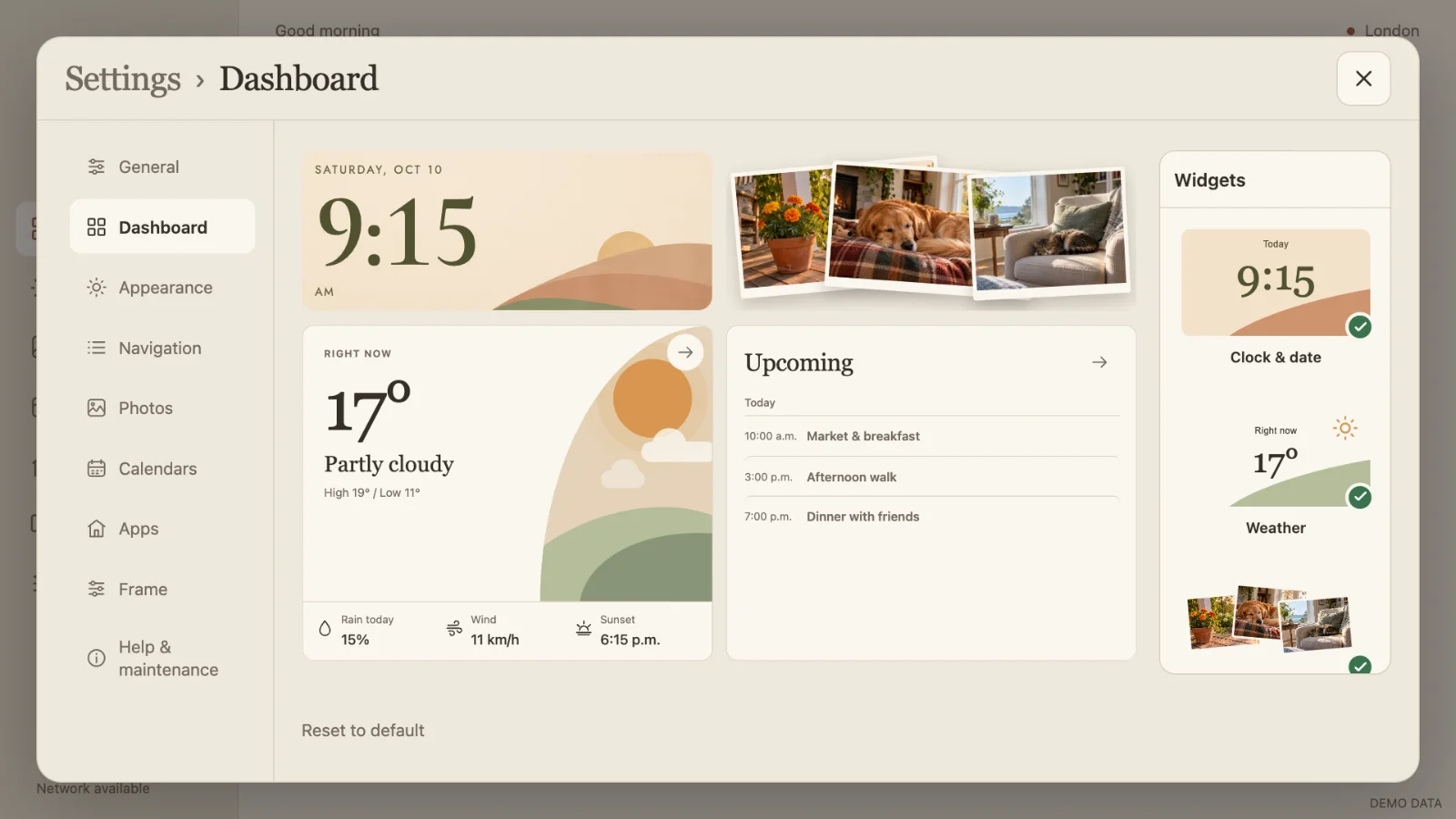
Open the editor
Open Settings → Dashboard. The preview follows your screen’s proportions. The Widgets gallery shows what is available and marks the widgets already included.
Choose from clock and date, weather, photos, upcoming events, hourly forecast, note, shopping list, countdowns and timers. Household content is local to the frame.
Move and resize
- Tap a widget to select it. Its options and four corner resize handles appear.
- Drag the widget to move it. Drag onto another widget to swap their slots when both fit.
- Drag a corner to resize. The small visual mark has a larger invisible finger-sized touch area. During a gesture the preview scales smoothly; its detailed layout settles when you release.
- Changes save on release. Overlapping or out-of-bounds placements are rejected. Removing a widget does not delete its underlying pictures or household content.
Choose a style or start again
Select Clock & date for Landscape, Analog, Flip or Botanical. Photos has Prints, Mosaic and Spotlight; Weather has Landscape, At a glance and Sky.
Reset to default opens a choice of Balanced, Photos first and Plans first layouts. It replaces the arrangement, not the content. Display-preference transfer does not include a custom dashboard arrangement.